Active@ KillDisk 24

Erase hard drive data properly
Your vote:
Latest version:
25.0.11 See all
Screenshots
1 / 26
Awards (6)
Show all awards
Software Informer Editor Rating 4 Software Informer Virus Free award
Download

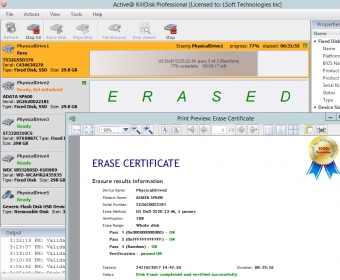
Active@ KillDisk is a secure data removal program that provides the perfect solution to anyone who is either donating their computer or selling it to someone else and wants to ensure that their private data has been properly deleted. It is also ideal in any other situations where you want to ensure that deleted data stays deleted in such a way that it can never be recovered. If you want to know how to erase hard drive data or data stored on any other type of device, then Active@ KillDisk provides the solution that you need. The program supports hard drives, SSDs, USB drives, flash memory cards, SCSI drives, ZIP drives and more. It operates from its own bootable environment. Active@ KillDisk supports 24 security standards including DoD 5220.22-M.

Active@ KillDisk erases all data on HDD and USB disks completely (the process removes ALL data from a physical disk(s) or logical drive's surface), also Active@ KillDisk can wipes out all unused space on disks, not touching existing data. Large sized RAIDs (disk arrays) sanitizing supported as well. The Ultimate version includes complete Linux Installation instead of just TAR archive. Its console supports Secure Erase - a low level ATA command for hardware erasing.

Comments (3)

User

Your vote:

I have used KillDisk for my personal year for a couple years now. It is very useful when one needs to dispose of old storage hardware. Apart from deleting whole drives it can also delete slack space. The app is very robust and reliable.

| Reply
E
This data erasure tool is a solid pick. I’ve used it a few times when getting rid of old computers and drives, and never had any issues. You can only wipe two drives at once, but I think you can buy extra slots if you need them. It also cleans out slack space, which is a nice touch. It supports a ton of sanitation standards, though honestly, three overwrites is perfectly fine and anything beyond an overkill.

| Reply
J
Jacob Botha 2 months ago
rating
KillDisk is a well-known name in the data sanitization world. It’s reliable, follows up-to-date sanitization standards, and comes with its own boot disk. With KillDisk, you can create labels, certificates, and more. However, it only supports two parallel erases at a time, and aside from wiping entire disks and slack space, it doesn’t offer additional features...which feels lacking in today’s era of integration. Most users might only use KillDisk a few times in their lives. Adding the ability to delete individual files and folders could make it more appealing and less of a “one-off” app.

| Reply

Related software

AOMEI Partition Assistant Standard Edition
AOMEI Partition Assistant
Free
rating

Create, resize, move, format, and convert hard disk partitions.

Active@ Partition Recovery
rating

Recover deleted or damaged partitions.

Magic Partition Recovery
rating

Scans the deleted partitions on your HDD and recovers them.

DoYourData Super Eraser
rating

Permanently remove files and programs from your PC.

Aomei Partition Assistant Lite Edition
Aomei Partition Assistant
Free
rating

Manage your partitions and customize them to fit your specific needs.

Related suggestions

Tags

Data recovery File recovery Secure deletion Remove boot sector One-pass zeros Preserve privacy Batch operations Bootable media Wipe disks Unused space